
BrowserPowers
Browse ExtensionsPower PacksTop ListsWhat Are Extensions? Log In Register
Extensity icon

Extensity

by sergiokas

Utilities extensions manage disable enable productivity toolbar speed chrome
Extensity icon

Extensity

by sergiokas
Utilities extensions manage disable enable productivity toolbar speed chrome
Screenshot 1
Screenshot 2

Quick Look

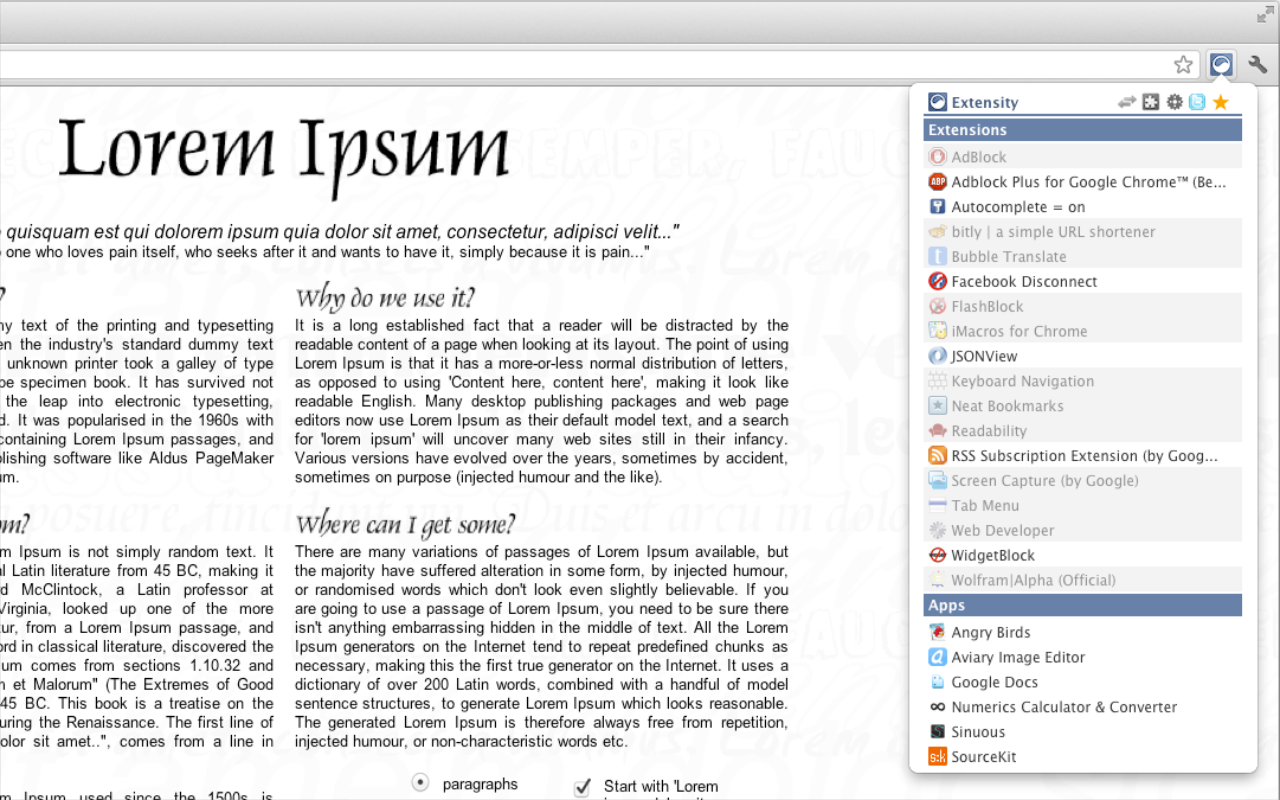
Extensity helps you quickly manage your Chrome extensions, boosting browser speed and keeping your toolbar tidy.

AI Overview

Who is this for?

Users with many Chrome extensions who want to improve browser performance and organization.

Key Features

  • → Quickly enable/disable extensions.
  • → Create profiles for different extension groups.
  • → Turn all extensions off/on with one click.
  • → Sync settings with Chrome Cloud Storage.
  • → Launch Chrome Apps.

Reviews Analysis

Overall Sentiment

Overwhelmingly Positive

Users highly praise Extensity for its efficiency in managing extensions, significantly improving browser speed and organization.

Note: AI analysis focuses on the substance and recency of reviews, which may differ from the overall store rating.


What Users Love

  • ✓ Greatly improves browser speed by disabling unused extensions.
  • ✓ Keeps the toolbar clean and organized.
  • ✓ Easy to switch between extension profiles.

Points to Consider

  • × Some users report occasional minor glitches or UI inconsistencies.

Official Description

From the Developer


Quickly enable/disable Google Chrome extensions

Tired of having too many extensions in your toolbar? Try Extensity, the ultimate tool for lightning fast enabling and disabling all your extensions for Google Chrome. Just enable the extension when you want to use it, and disable when you want to get rid of it for a little while. You can also launch Chrome Apps right from the list.

* Keep your browser lean and fast - disable extensions that you won't use right away. * Keep your toolbar clean. * Turn all extensions off (and back on) with a single click. * Quick switch between several extensions groups using the Profiles feature. * Allow your most important extensions to be always enabled. * Keep computers in sync with Chrome Cloud Storage support. * Ideal companion for extensions collectors.

Follow us in Twitter: https://twitter.com/ExtensityChrome

Website: https://sergiokas.github.io/Extensity/

Extensity is free software. Full source code at GitHub https://github.com/sergiokas/Extensity

Your extension? Let us know if we can update or correct anything!

Key Info

  • Rating:
    4.8/5.0

    (1.8K ratings)

  • Users:300,000
  • Version:1.14.0
  • Updated:Sep 02, 2024
  • Developer:Visit Website →

Stats from Chrome Web Store


Add to Chrome / Chromium

You Might Also Like

Custom Chrome - Extension Manager icon

Custom Chrome - Extension Manager

by Ciaran & Chris

This extension allows users to easily enable and disable other Chrome extensions and create profiles for different sets of extensions.

View Details →
Utilities Extension manager Productivity Profiles
Custom New Tab URL icon

Custom New Tab URL

by [email protected]

Replaces Chrome's default new tab page with a custom URL of your choice, including local files.

View Details →
Utilities New tab Customize Url
HyperTube - ускорение Ютуба icon

HyperTube - ускорение Ютуба

by HyperTube

HyperTube is a YouTube extension designed to accelerate video loading and playback, especially in regions with slow internet or restrictions, while also offering ad-free viewing.

View Details →
Utilities Youtube Speed Video
OneClick Cleaner for Chrome icon

OneClick Cleaner for Chrome

by Smart Software

OneClick Cleaner for Chrome helps speed up your browser and protect your privacy by quickly cleaning up browsing data like cache, history, and cookies.

View Details →
Utilities Cleaner Cache History
SearchBar icon

SearchBar

by Jacob H

SearchBar enhances your browsing by providing a customizable toolbar for efficient searching across your favorite search engines.

View Details →
Utilities Search Toolbar Productivity
Settings icon

Settings

by Free Software Utilities

This extension provides a one-click shortcut to access Google Chrome's settings page, saving users time and unnecessary clicks.

View Details →
Utilities Settings Chrome Shortcut
Screenshot

Join & Upgrade Your Browser Experience

Create your account and get our newsletter with the latest extensions, power packs, and top lists delivered straight to your inbox. Join thousands of users who are already browsing smarter!

🚀 Join & Upgrade Your Browser

✨ 100% Free • Create account & get newsletter • Join over 2,000 smart browsers

BrowserPowers

Your ultimate directory for discovering, comparing, and managing the best browser extensions.

Content

  • Browse Extensions
  • What are Extensions?
  • Power Packs
  • Top Lists

Categories

  • Productivity
  • Privacy & Security
  • Developer Tools
  • Social
  • Shopping
  • News
  • Education
  • Entertainment
  • Photos & Video
  • Accessibility

Popular Tags

  • AI
  • Ad-blockers
  • Dark Mode
  • Note Taking
  • Open Source
  • Password Managers
  • Screen Capture
  • Translation
  • Price Trackers
  • Tab Management

Connect

  • [email protected]
  • ⊕ Add Your Extension

© 2026 BrowserPowers, All rights reserved | Privacy Policy | Terms of Service

[a dumb idea]